
Doc to Pages Converter
You don’t need to upload a Word document to a conversion website to use it in Pages: Pages opens .docx files directly and can save them as .pages. What’s worth doing first is checking what might not survive the trip — unusual fonts, tracked changes, comments and complex layouts. This tool inspects your .docx locally and can also export its text as RTF, HTML or plain text.
- Free to use
- No sign-up
- Runs in your browser
Word to Pages compatibility checker and converter
Choose a .docx file to check it. Older .doc files (Word 97–2003) use a binary format this tool can’t read — Pages can still open most of them directly.
Document Conversion Checklist Pack
Printable Word-to-Pages and Pages-to-Word conversion checklists, a font compatibility reference, and a document handover template for sharing files between Mac and Windows users.
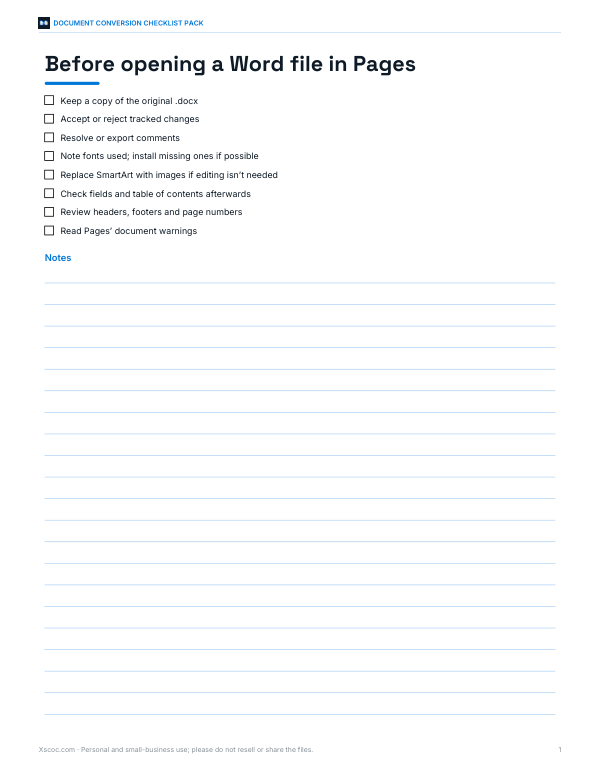
- Word to Pages checklist (PDF/DOCX)
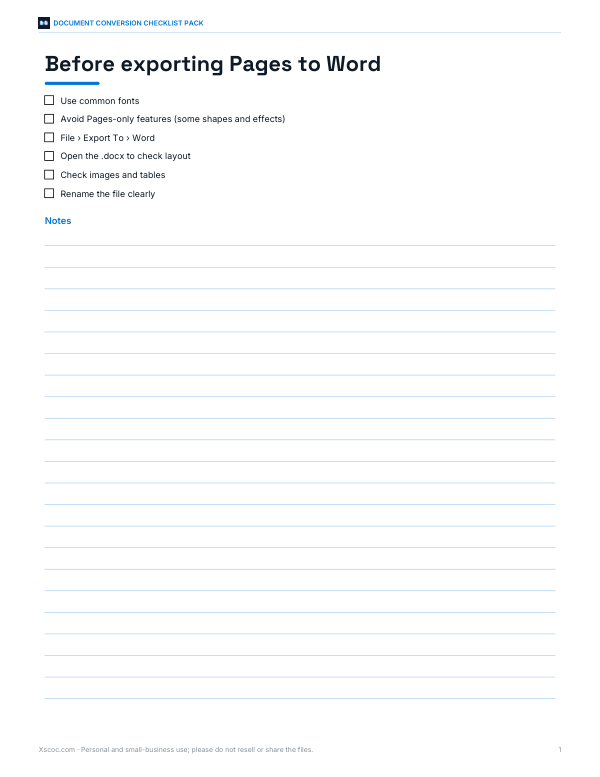
- Pages to Word checklist (PDF/DOCX)
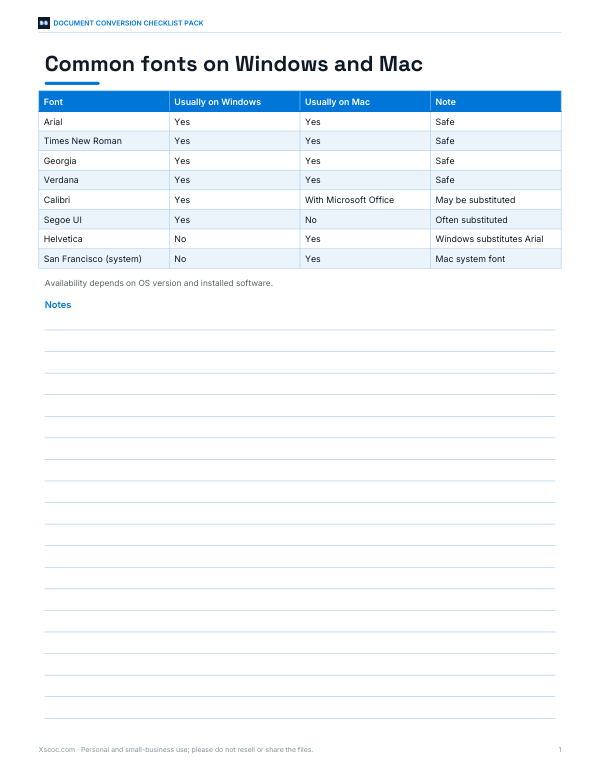
- Font reference (PDF)
- Handover template (PDF/DOCX/XLSX)
Formats: PDF, DOCX, XLSX. Instant download after payment (link valid 72 hours, up to 5 downloads). AI-assisted: the templates were drafted with AI help and reviewed and laid out before publishing.
$5.00 USD, one-time 4 files · about $1.25 each
- Instant download
- 7-day refund
- Secure checkout by Stripe
7-day money-back guarantee. Full refund within 7 days of purchase, even after you download.
Free sample: Document Handover Template (PDF, 47 KB)
Full refund within 7 days — see the refund policy and license.
Free printables
Single sheets you can print right now, no sign-up. The full pack adds every sheet in one download plus the editable files.
 Document Handover Log Template
You don’t need a converter to open Word files in Pages
- In Pages on a Mac, iPad or iPhone, choose File › Open (or tap the file in the Files app) and pick the .docx or .doc file.
- Pages converts it and opens a new Pages document; any problems are listed in a “Document Warnings” notice.
- To save it as a Pages file, choose File › Save and it will be stored in .pages format.
- To send it back to Word users, choose File › Export To › Word.
On iCloud.com, Pages works the same way in the browser. The checker on this page is for looking at a Word file before you convert it, or for extracting its text.
What usually converts well — and what may not
| Feature | In Pages |
|---|---|
| Text, headings, bold and italic | Converts well |
| Tables and images | Usually converts; complex layouts may shift |
| Fonts not installed on the Mac | Replaced with a similar font |
| Tracked changes | Pages supports change tracking, but results are cleaner if you resolve them first |
| Comments | Usually imported |
| Fields, tables of contents, cross-references | May become static text or need rebuilding |
| SmartArt and some charts | May import as pictures |
| Macros and form controls | Not supported |
Pages’ import behaviour varies with the Pages version; the warnings Pages shows when it opens the file are the definitive list for your document.
Worked example
A student receives a 12-page .docx report and wants to finish it in Pages on a MacBook. The checker lists the fonts Calibri, Cambria and “Segoe UI Semibold”, flags Segoe UI as possibly missing on a Mac, and finds 14 tracked changes and a table of contents field. The student accepts all changes in Word on a lab computer, then opens the file in Pages, which substitutes a similar font and converts the table of contents — which the student refreshes in Pages’ own table of contents tool.
About the export options
| Format | Keeps | Good for |
|---|---|---|
| RTF | Paragraphs, bold, italic, headings (approximately) | Opening in Pages, TextEdit or any word processor |
| Clean HTML | Headings, paragraphs, bold, italic | Web pages, blogs, email newsletters |
| Plain text | Text only | Notes, code editors, copy-paste |
These exports deliberately drop layout, images and styles to give you clean text. For a faithful conversion with layout, open the .docx in Pages directly.
Why check locally?
Many online “converters” require uploading your document to a server. Coursework, contracts and business documents may contain personal or confidential information. This tool reads the .docx file with your browser (a .docx is a zip archive of XML files) and never sends it anywhere.
Troubleshooting
| Problem after opening in Pages | Likely fix |
|---|---|
| Text reflows or pages break differently | Different fonts or spacing — install the fonts or adjust styles |
| Table of contents shows old page numbers | Refresh or rebuild it with Pages’ table of contents |
| Images moved | Set images to “move with text” and check wrap settings |
| Numbered lists restart | Re-apply list styles in Pages |
| Equations look wrong | Retype them with Pages’ equation tool |
Other ways to move documents between Word and Pages
| Route | How | Notes |
|---|---|---|
| Pages on Mac, iPad, iPhone | Open the .docx directly | Best fidelity; free with Apple devices |
| Pages on iCloud.com | Upload the file to iCloud Drive and open it in Pages in the browser | Works from Windows PCs too |
| Microsoft Word for Mac | Keep working in .docx | Avoids conversion entirely |
| Export from Pages | File › Export To › Word / PDF / RTF / EPUB | For sharing back |
If a colleague sends you a .pages file and you don’t have a Mac, ask them to export it to Word or PDF, or open it in Pages on iCloud.com.
Tips for smooth conversions
- Use common fonts, or install the same fonts on the Mac.
- Accept or reject tracked changes and resolve comments before converting.
- Keep layouts simple: styles for headings, real tables instead of tabs, images inline with text.
- After converting, check headers, footers, page numbers and the table of contents.
- Keep the original .docx until you’ve checked the Pages version.
Privacy
Files are read in your browser and never uploaded.
Frequently asked questions
How do I convert a Word document to Pages?
Open the .docx in Pages and choose File › Save; no separate converter is needed.
Can Pages open .doc files?
Yes, Pages can open most older .doc files as well as .docx.
Why do my fonts change in Pages?
The fonts aren’t installed on your Mac, so Pages substitutes similar ones.
Is my document uploaded?
No — this tool reads it in your browser.
Can this tool create .pages files?
No — the .pages format is created by Pages itself; this tool checks the file and exports RTF, HTML or text.
How do I send a Pages document to a Word user?
In Pages, choose File › Export To › Word.
Can Word open .pages files?
Not directly — export from Pages to Word, or use Pages on iCloud.com.
Does the checker work with .docm files?
Yes, it reads them like .docx and will flag that macros are present.
Why is my .docx “not a zip”?
The file may be damaged, password-protected or actually an older .doc with a .docx name.
Will images be included in the RTF?
No — the exports keep text and basic formatting only.
Is there a file size limit?
Only your device’s memory; very large documents take a little longer to read.